On a typical weekday, our support engineers at Atlan used to start their shift in Zendesk with a familiar feeling: too many tickets, not enough clarity.
Someone from the team was always wearing an unofficial second hat – queue manager. They would scan every new issue, guess whether it belonged to a particular product area or issue type, check who was on shift, juggle calendars, and try to keep workloads fair while their own tickets piled up in the background.
It worked – until it didn’t.
As our customer base grew and we expanded coverage across time zones, this manual triage model started to break down:
- New tickets could sit unassigned if the queue manager was AFK or deep in an escalation.
- Engineers in later shifts sometimes walked into spiky, unbalanced queues.
- Weekend and holiday coverage depended heavily on whoever happened to be online and vigilant enough to spot incoming work.
We needed a way to take humans out of the queue management loop – without losing empathy, fairness, or control.
That’s how Olof was born.
The Problem: Manual Queue Management doesn’t Scale
Before Olof, assigning a single Zendesk ticket often looked like this:
- Read and understand the ticket.
- Decide which product area or issue type it belonged to.
- Check who was on shift.
- Ask “who’s already overloaded?”.
- Consider when each person’s shift ended.
- Finally, assign manually in Zendesk and ping them on Slack.
This meant:
- Latency: Tickets could wait for assignment, especially during handovers or when queue managers were in calls or incidents.
- Cognitive load: Engineers were splitting their attention between solving issues and constantly watching the queue.
- Fairness by feel: Even with the best intentions, “who looks free?” isn’t a scalable or auditable way to balance load.
As we evolved our Support Engineering staffing model and added more regions, shifts, and pods, the cost of getting assignments wrong increased sharply.
We didn’t just need “faster assignment”. We needed a reliable, explainable system that could make better assignment decisions than any one human – and do it 24/7.
Meet Olof: an AI-powered queue manager for humans, not just tickets
Olof is our AI-native automation system that owns Zendesk ticket assignment end-to-end:
- It uses AI to categorize tickets into specific product areas and issue types from their text.
- It looks up who’s on shift, who’s unavailable, and how many tickets everyone has right now.
- It picks the best engineer using deterministic logic over that context.
- It assigns directly in Zendesk and posts to a public Slack channel plus a DM to the engineer, so nothing gets missed.
From the engineer’s point of view, Olof feels like a very disciplined, very alert teammate who:
- Never forgets that you’re on leave or in a long meeting.
- Doesn’t get tired of balancing workloads.
- Keeps the team informed in real time through Slack.
Internally, Olof is powered by two complementary workflows running in n8n:
- Ticket Assignment – a webhook trigger that assigns tickets as soon as they are created.
- Queue Clearance – a scheduled workflow that cleans up any unassigned or handover tickets in the queue.
Together, these workflows ensure we have near-real-time assignments for new tickets, and a safety net for anything that slips through.
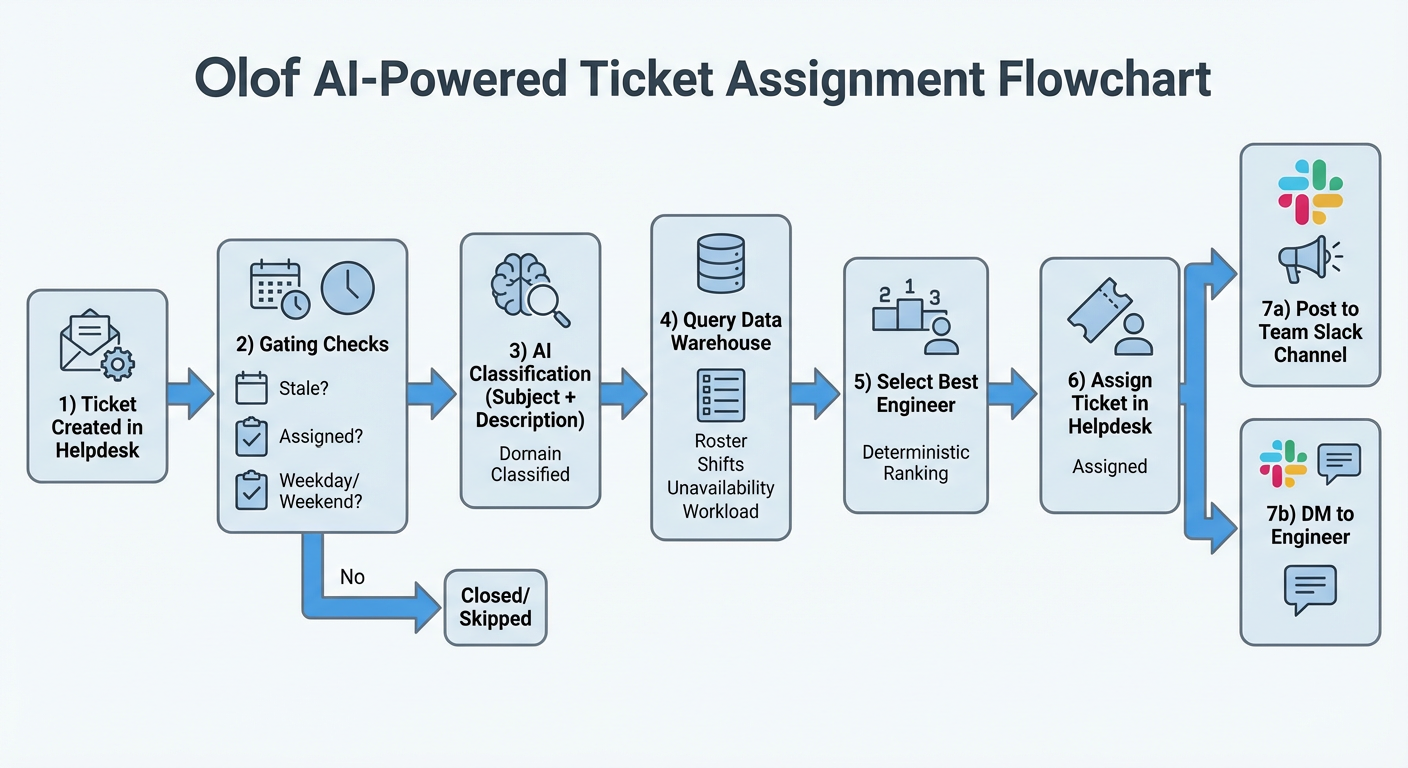
How Olof works under the hood
1. Real-time trigger from Zendesk
When a ticket is created with no assignee, Zendesk calls an n8n webhook. Olof:
- Reads the ticket payload.
- Checks whether it’s a weekday. On weekends, incidents are handled via a separate incident.io flow.
- Extracts the subject and description to feed into an AI agent.
2. AI-powered ticket categorization
The first AI step is fast, low-latency classification:
- Model: small GPT / Claude models configured via Atlan’s LLM gateway.
- Output: a high-level category (product area / skillset) based on ticket text and tags.
3. Availability and workload in Snowflake
From all the available engineers, Olof checks who can actually take this ticket right now.
All support engineers live in a Snowflake-backed table with fields like:
- Name & email
- Category (product area/skillset)
- Shift window (queue_start_time, queue_end_time)
- Round-robin counter
- Unavailability windows
Using a combination of Snowflake SQL and n8n, Olof:
- Filters engineers who:
- Are active in the roster.
- Are currently inside their queue window (with correct handling for overnight shifts).
- Match the target category.
- Are not in a blackout / unavailability window.
- Checks real-time workload per engineer:
- Uses a Zendesk view that tracks all tickets assigned to each engineer in the previous 12 hours.
- For every engineer, compute how many tickets are currently in their active queue over that window.
- Feeds this per‑engineer ticket count into the ranking logic so Olof can prefer engineers who have more bandwidth.
- Ranks candidates using a deterministic algorithm:
- Category priority (exact match before hybrids).
- Ticket count (fewer tickets first).
- Hybrid vs specialist tie-breaks.
The result: one “best fit” engineer per ticket, with a clear explanation of why.
If no one is currently in shift (extremely rare, but a possibility), a fallback query finds the earliest next-shift engineer, assigns there instead and notifies leadership, ensuring tickets never sit unowned.
4. Assignment and notifications
Once a target engineer is selected, Olof:
- Updates the round-robin counter in Snowflake for fairness across time.
- Assigns the ticket in Zendesk using the engineer’s email.
- Posts to Slack:
- In #alerts-ticket-assignment public Slack channel, with a Block Kit message:
- Ticket link and ID.
- Assignee mention.
- Ticket count for that engineer.
- As a DM to the engineer, so they can’t miss critical assignments.
- In #alerts-ticket-assignment public Slack channel, with a Block Kit message:
The message looks like:
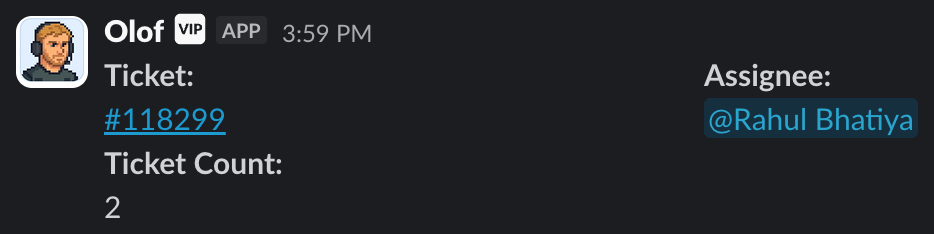
This gives the whole Support team real-time visibility into who’s picking up what and how work is distributed.
Respecting real-life availability
One of the earliest lessons: shift calendars aren’t the full story.
Engineers might be technically “in shift” but unavailable because of:
- PTO or sick leave
- Customer calls
- Deep-dive investigations or escalations
To handle this, Olof integrates with a simple Slack-driven unavailability flow:
- Engineers run a /unavailability command in the dedicated channel.
- They provide start & end times plus a reason.
- The entry is stored in a database keyed by email.
- Olof skips those engineers for new assignments until their unavailability ends.
All updates are visible in a public Slack channel, so the whole team understands why certain people are not receiving tickets.
This helped us preserve human control and transparency, even as we automated more and more of the assignment process.
Handshake with Nora: when two AIs share a queue
Olof isn’t the only AI in our support engineering stack.
We also have Nora, our AI teammate that:
- Reads incoming tickets.
- Responds automatically when confident.
- Hands off to humans when uncertain.
When Nora gained the ability to send multiple responses within the same ticket (instead of a single reply), we needed to rethink how Olof behaved:
- If Olof assigned tickets too early, engineers could start working on tickets Nora was still confidently handling.
- If we delayed Olof too much, handovers from Nora to humans might lag.
We iterated through a few approaches:
- Introduce a 5‑minute delay so Nora could pick up what she could before Olof assigned anything.
- Observe that this introduced its own edge cases.
- Settle on a model with two flows:
- Nora + Olof: Nora handles tickets first; if she’s uncertain, Olof assigns to a human as usual.
- Queue Clearance: a separate workflow that picks up “Nora handover” tickets and assigns them based on timestamps and availability.
The outcome:
- “Nora handover” tickets are treated as a distinct, intentional event.
- Engineers only see tickets once there’s a clear expectation that human support is needed.
- We’ve reduced overlapping efforts and ghost assignments — the same ticket being worked by both Nora and a human, or assigned when it should still be in self-serve mode.
This is a good example of how Olof has evolved not just as a static automation, but as part of a living, AI-native Support ecosystem.
What changed for support engineers and customers
1. From manual triage to always-on automation
Before Olof, queue managers had to constantly watch Zendesk to maintain a healthy queue. After Olof:
- Assignment became real-time and consistent, even during lunch breaks, handovers, or high-volume spikes.
- Support engineers (who wore the second hat of a queue manager) stopped spending cycles on “who should take this?” and started focusing on long-running tickets, escalations, and structural improvements.
Olof enabled end‑to‑end ticket assignment automation, balanced load, and freed queue leads for impact work.
2. Fairness and load balance you can see
Because Olof’s decisions are based on ticket counts in the last 12 hours, category fit, and round-robin, engineers started to feel the assignments were:
- Predictable – fewer “why did I get three in a row?” moments.
- Explainable – anyone can look at the Slack message, the assignment table, and the current queue to understand “why me?”.
Fairness stopped being a matter of perception and became part of the system’s design.
3. Respect for real life
The /unavailability flow means:
- People can step away for PTO, sick days, internal projects, or deep work without worrying that Olof will keep sending them tickets.
- Team‑wide visibility into unavailability helps reduce accidental pings and handovers to the wrong person.
It’s a small piece of the system, but critical for making automation feel humane.
4. More resilient weekends and special events
Because assignment is codified, we can design clear staffing models for unusual days – offsites, hackathons, and holidays – without manually micro‑managing the queue.
Olof made it possible to operate confidently on days where the entire team schedule looked nothing like “normal”.
5. A foundation for the next wave of AI-native support
Olof is now a key part of how Support has become more automated and AI-native:
What started as a way to “save queue managers time” has become infrastructure we rely on to keep promises to customers at scale.
Lessons from building Olof
Looking back, a few principles stand out for anyone attempting something similar:
- Make the system explainable.
Fairness logic lives in SQL, code, and Slack messages, not in someone’s head. That builds trust when automation makes decisions on behalf of humans.
- Treat availability as a first-class signal.
Shift windows, unavailability blackouts, weekend rules, and dedicated engineer logic are all baked into the assignment path. This let us encode “how the team actually works” instead of just “how the schedule looks on paper”.
- Design for other AIs from day one.
Integrating with Nora forced us to think carefully about handoffs between machines, not just humans. The result – separate Nora/Olof and queue-clearance flows – gave us cleaner semantics and fewer ghost assignments.
- Start with one pain point, grow into a platform.
We began with “assign tickets fairly and quickly”; over time Olof absorbed:
- Dedicated engineer assignment.
- Weekend and meetup staffing nuances.
- Named accounts and future expansion plans for deeper SME routing.
- Ship, then iterate in the open.
Many of Olof’s improvements were driven by support team’s feedback – from suggestions about Nora handoffs to ideas for new routing rules.
Building in public with the team helped us catch edge cases early and keep everyone aligned on how the system behaves.
Summary
Today, Olof is the default queue manager in Atlan’s support team. It:
- Assigns tickets in real time across multiple shifts and regions.
- Balances load across skillsets and categories.
- Respects real availability and dedicated engineer commitments.
- Plays nicely with other AI systems.
For us, Olof is a concrete example of what it means to build an AI-native CX org at Atlan: not just adding an LLM to responses, but quietly rewiring the systems that decide who works on what, when, and why.
And the best part?
Most days, engineers don’t even notice Olof – it’s no longer a shiny new tool, it’s just how work gets done.
Tickets quietly flow to the right people, at the right time, without anyone watching the queue. Engineers open Zendesk, find the right tickets already waiting for them, and dive straight into solving real problems.
For Atlan’s Support Engineering team, that’s what being AI‑native really looks like.